Samsung has remained one of the biggest names in the Android tablet market for years. While smartphones often receive most of the attention, the company’s tablets have gradually become more powerful, versatile, and useful for everyday life. Whether you want a device for watching movies, studying, drawing, gaming, working, or simply browsing the internet, Samsung’s latest Galaxy Tab lineup offers options for different types of users.
But choosing the right model is not always simple. New devices arrive with larger displays, faster processors, improved software, better accessories, and increasingly capable AI-powered tools. At the same time, older models may still offer excellent performance at a lower price. So, should you always buy the latest model?
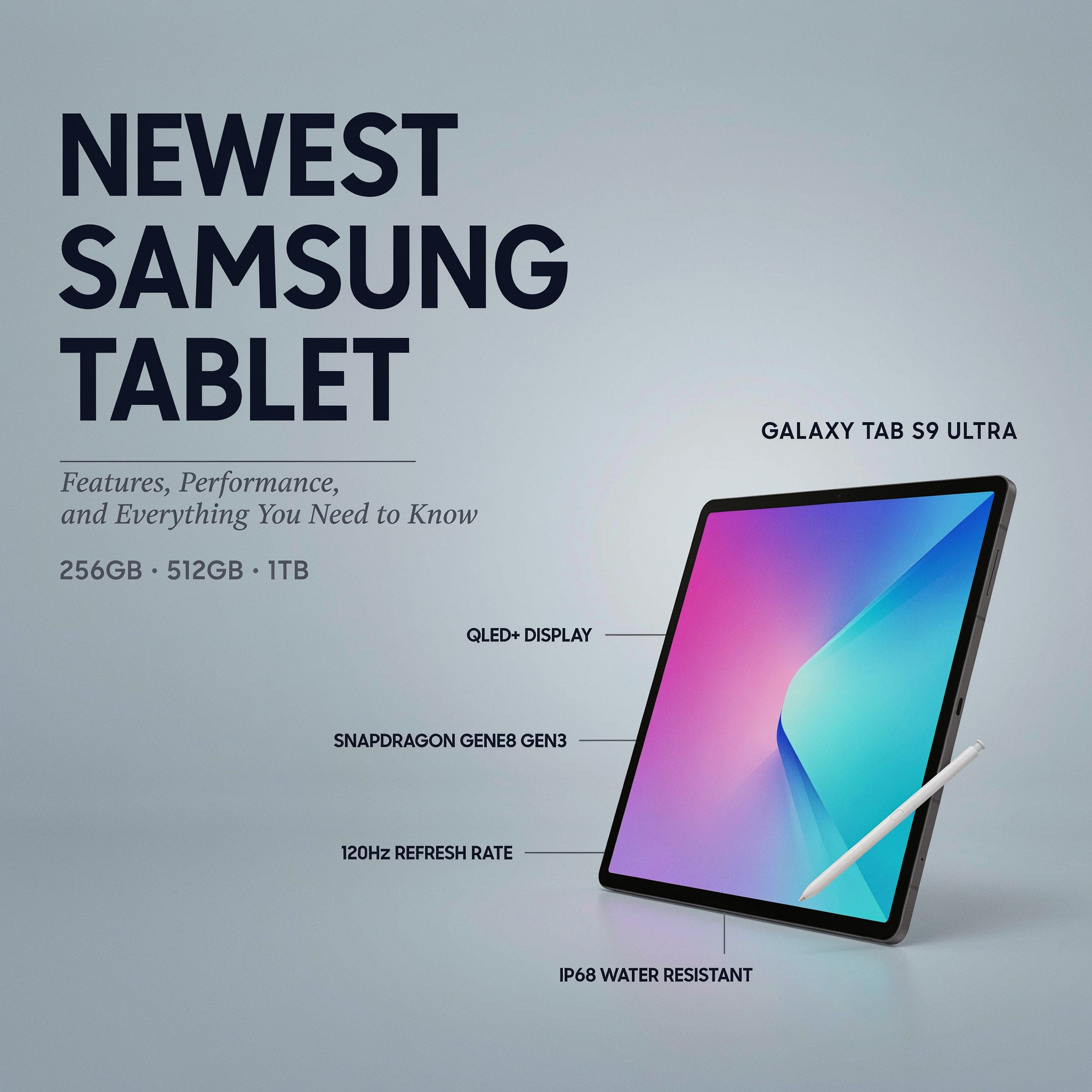
This guide explores the newest Samsung tablet experience, the latest Galaxy Tab family, key features, performance, display quality, software, productivity tools, battery life, accessories, and the factors you should consider before making a purchase. Think of a modern tablet as a Swiss Army knife with a screen: it can be a notebook, entertainment center, portable office, sketchpad, and travel companion, depending on how you use it.
Understanding Samsung’s Current Galaxy Tab Lineup
Samsung does not design every tablet for the same type of person. Its range usually includes premium models, more affordable alternatives, and devices designed around specific needs.
At the top of the range, the Galaxy Tab S series focuses on advanced features. These models generally offer powerful processors, high-quality displays, premium materials, S Pen support, and productivity tools. They are aimed at people who want more than a basic screen for watching videos.
Below the flagship range, Samsung also offers more affordable tablets for entertainment, web browsing, online learning, reading, and general family use.
The premium Galaxy Tab experience is designed for users who want a laptop-like workflow without carrying a traditional computer everywhere. Larger screens, keyboard accessories, multitasking features, and desktop-style software all play an important role here.
Meanwhile, budget-friendly options focus more on accessibility. You may not get the fastest processor or the most advanced display, but you can still enjoy streaming, video calls, social media, and everyday apps.
The key question is simple: What do you actually need your tablet to do?
Someone who only watches YouTube and Netflix does not necessarily need the same hardware as a digital artist editing large illustrations. Likewise, a student taking notes may value stylus support more than raw gaming performance.
A Bigger and Better Display Experience
The screen is arguably the most important part of any tablet. Unlike a smartphone, a tablet is designed around giving you more visual space.
Samsung’s higher-end devices are known for large, sharp displays that make content more immersive. Depending on the model, you may find AMOLED or LCD technology, different refresh rates, and varying screen sizes.
AMOLED displays are particularly attractive for entertainment because they can deliver deep blacks, strong contrast, and vibrant colors. Watching movies on a high-quality tablet can feel far more engaging than watching them on a small phone.
A larger screen also changes how you work.
Imagine trying to write an email, read a document, and check a website on a small phone. You constantly switch between apps. On a tablet, there is more room to keep multiple windows visible at once.
For students, that could mean reading a digital textbook while taking notes. For professionals, it might mean attending a video meeting while reviewing a presentation.
Some Samsung tablets also support higher refresh rates, making scrolling, animations, and supported games feel smoother. While this may not be essential for every user, it can make the device feel faster and more responsive.
However, bigger is not always better.
A large tablet offers more workspace, but it can also be heavier to carry. If portability is your priority, a smaller model may be easier to hold during travel or while reading in bed.
Performance: How Fast Is a Modern Galaxy Tab?
Performance depends heavily on which model you choose. Premium devices are built with more powerful processors and additional memory, while entry-level tablets focus on basic everyday tasks.
For general use, modern Samsung tablets can comfortably handle:
- Web browsing
- Video streaming
- Social media
- Online classes
- Video calls
- Reading
- Music streaming
- Basic photo editing
Higher-end models are better suited to more demanding activities such as advanced multitasking, professional creative apps, high-end gaming, and larger productivity workloads.
More power matters when you multitask.
Opening one app is easy for almost any modern device. The real difference appears when you have several applications running at the same time.
For example, you might have a browser open on one side of the screen, a document in another window, and a messaging app floating nearby. A more powerful processor and additional RAM can help the tablet handle that workload more smoothly.
Gamers may also notice the difference. Demanding games require stronger graphics performance, particularly when using higher-quality settings.
Still, raw benchmark numbers do not tell the entire story. Software optimization, cooling, battery efficiency, and storage speed can also influence the overall experience.
A tablet that looks powerful on paper may not always feel dramatically different during simple activities. That is why it is important to match the hardware with your real-world needs instead of automatically choosing the most expensive option.
The S Pen Makes a Major Difference
One of the most useful features associated with Samsung’s premium tablets is stylus support.
The S Pen can transform the device from a simple touchscreen into a digital workspace.
For students, it can be used for handwritten notes, diagrams, annotations, and highlighting important information.
For artists, it provides a more natural way to draw, sketch, and create digital illustrations.
For professionals, it can be useful for signing documents, marking presentations, and writing quick ideas.
Writing with a stylus is not identical to writing on paper, but modern tablet software has made the experience increasingly practical. You can organize notebooks, search digital notes, move handwritten content, and combine text with images.
The S Pen is especially useful for people who think visually.
Sometimes typing an idea feels slow. Drawing a quick diagram, circling an important section, or writing a note directly onto a document can be much faster.
This is where a tablet begins to feel different from a laptop. A laptop is excellent for typing, but a tablet gives you the freedom to touch, tap, write, and draw directly on the display.
For many users, that flexibility is one of the biggest reasons to choose a Galaxy Tab.
Samsung DeX and the Desktop-Style Experience
One of Samsung’s most interesting software features is DeX.
Samsung DeX is designed to provide a more desktop-like interface. Instead of interacting with applications in a traditional mobile layout, you can work with resizable windows, taskbar-style controls, and multiple apps on the screen.
This can be particularly useful when you connect a keyboard.
A tablet with a keyboard can become a lightweight workstation.
You can write documents, answer emails, browse websites, manage files, and work with several applications at once.
Of course, it does not completely replace a high-powered desktop computer for everyone. People working with advanced software, complex programming tools, or professional video production may still prefer a traditional computer.
However, for many everyday tasks, the experience can be surprisingly capable.
Imagine carrying a device that works as an entertainment screen during a flight, a notebook during a lecture, and a compact workstation at a hotel. That kind of flexibility is where Samsung tablets can stand out.
The experience becomes even more useful if you already use other Galaxy devices because Samsung’s ecosystem includes tools designed to help devices work together.
Software, Multitasking, and Everyday Features
Hardware is only one part of the story. A large screen needs software that can actually take advantage of the extra space.
Samsung’s tablet software includes several multitasking features that allow users to work with more than one app.
You can split the screen between applications, use floating windows, drag and drop certain content, and move between tasks more easily than on a typical smartphone.
Multitasking feels more natural on a tablet.
For example, you could watch a tutorial while following the instructions in another app. A student might research a topic in a browser while writing notes. A shopper could compare products without constantly switching back and forth.
Samsung also includes its own software features alongside the broader Android app ecosystem.
However, app optimization remains an important consideration. Not every Android application takes full advantage of a large display. Some apps may simply look like enlarged smartphone applications.
The situation continues to improve as developers create better large-screen layouts, but the experience can still vary depending on the apps you use most frequently.
Before buying a tablet, it is worth thinking about your favorite applications. Do they work well on larger screens? Can you use them for work or study? These questions may matter more than having the fastest processor available.
AI Features and Smarter Everyday Tools
Artificial intelligence has become an increasingly important part of modern technology, and tablets are now included in that shift.
Samsung has introduced AI-powered tools across its ecosystem to help with activities such as writing, searching, translating, organizing information, and working with images.
AI can act like a digital assistant sitting quietly beside you.
It may help summarize information, assist with note organization, translate content, or provide easier ways to search for what you see on the screen.
For example, imagine seeing an unfamiliar object in an image. Instead of typing a detailed description into a search engine, visual search tools can make it easier to look for related information.
AI-powered writing and note tools may also help users organize large amounts of information.
Students could potentially benefit from faster note management, while professionals may find value in summarizing lengthy documents.
However, AI should be viewed as an assistant rather than an expert that is always correct.
Generated summaries can miss important context. Automated answers may occasionally contain mistakes. For important work, school assignments, financial decisions, or other serious matters, it is still important to review the information yourself.
The best approach is to use AI to save time, not to stop thinking.
Battery Life and Charging Expectations
Battery life is one of the most important considerations for a portable device.
After all, what is the benefit of carrying a powerful tablet if you constantly need to search for a charger?
Samsung tablets generally use large batteries, especially in larger premium models. Actual endurance, however, depends on several factors.
These include:
- Screen brightness
- Display size
- Refresh rate
- Processor activity
- Gaming
- Video streaming
- Wi-Fi or mobile connectivity
- Background applications
Light use and heavy use can produce very different results.
Reading an ebook or browsing websites may consume less power than playing a demanding game for several hours.
Streaming high-resolution video can also affect battery life, especially with a bright display.
Charging speed is another consideration. Fast charging support can reduce waiting time, but users should check what is included in the box and whether a compatible charger must be purchased separately.
If battery life is your main concern, it is usually better to look at real-world testing rather than relying only on battery capacity numbers. A larger battery does not automatically guarantee longer endurance because the screen and processor also consume power.
Cameras and Audio: More Important Than You Might Think
People do not usually buy a tablet primarily for photography. Smartphones are smaller and easier to use for taking pictures.
However, tablet cameras can still be useful.
The front camera is particularly important for:
- Video calls
- Online meetings
- Virtual classes
- Family conversations
- Remote work
A good front-facing camera can make the tablet much more practical for communication.
Rear cameras may be useful for scanning documents, capturing notes, photographing whiteboards, or quickly saving information.
Audio quality also matters.
A large screen is perfect for movies and television, but the experience can feel incomplete without good speakers.
Samsung’s premium models often focus on multi-speaker systems designed to create a more immersive sound experience.
For casual entertainment, built-in speakers may be enough. For music enthusiasts or frequent travelers, Bluetooth headphones can provide a more personal experience.
The combination of a large display and quality sound can make a tablet a strong entertainment device, particularly when you do not want to carry a laptop.
Accessories Can Change the Entire Experience
A tablet by itself is useful, but accessories can dramatically expand what it can do.
The most common accessories include keyboards, protective cases, styluses, and external storage options where supported.
A keyboard accessory is especially important for productivity.
If you regularly write long emails, articles, reports, or school assignments, typing on a physical keyboard is usually more comfortable than using the touchscreen.
A protective case can also make a difference. Tablets are large and relatively thin, which means protecting the display and corners is a smart idea.
For creative users, the stylus is often the most valuable accessory.
It can turn the tablet into a digital canvas for illustrations, handwritten notes, and design work.
However, accessories can add significantly to the total cost.
A tablet may appear affordable until you add a keyboard, case, charger, and other extras. Before making a purchase, consider the complete setup you actually need.
The cheapest tablet is not always the best value if you eventually spend a large amount on accessories.
Choosing the Right Size for Your Needs
Tablet size can have a major impact on your experience.
A smaller model is easier to carry and hold. It may be better for reading, travel, casual browsing, and younger users.
A medium-sized tablet can provide a balance between portability and workspace.
A larger model offers more room for multitasking, creative projects, video editing, and productivity.
Think about where you will use it most.
If you mainly use your tablet on the sofa, a larger screen may be ideal.
If you want to carry it to school, work, or while traveling, weight and size may become more important.
There is no universally perfect display size.
A huge screen may feel amazing when watching movies but inconvenient when trying to hold it with one hand. A compact model may be easy to carry but feel restrictive when working with multiple apps.
The best choice depends on your daily routine.
Is a Samsung Tablet Good for Students?
Samsung tablets can be excellent tools for students, especially when paired with a stylus and note-taking software.
Instead of carrying multiple notebooks, a student can organize subjects digitally.
You can write notes, insert images, annotate PDFs, highlight reading material, and store everything in one place.
Digital organization can reduce clutter.
Imagine carrying one slim device instead of several notebooks, textbooks, and folders. That convenience can be valuable, particularly for students who move between classes.
A tablet can also support online learning, research, presentations, and video calls.
However, students should consider whether they need a keyboard.
For handwritten notes, a stylus may be enough. For long essays and assignments, a physical keyboard could make the device much more practical.
Budget is another important factor. A premium model may offer excellent performance, but a more affordable device could handle most academic tasks perfectly well.
Students should avoid paying for features they are unlikely to use.
Gaming and Entertainment on Samsung Tablets
Tablets are naturally suited to entertainment.
A large display makes movies, television shows, and videos more enjoyable. Streaming platforms, web content, and games all benefit from additional screen space.
For gaming, premium Samsung tablets can provide powerful processors, smooth displays, and large screens.
A tablet can feel like a portable entertainment stage.
Instead of watching everything through a small phone display, you have more room to see details.
Games can also benefit from the larger screen, although touchscreen controls are not always ideal for every genre. Some users may prefer compatible controllers for a more console-like experience.
Cloud gaming services may also appeal to users who want access to demanding games without relying entirely on the tablet’s internal hardware.
However, a stable and fast internet connection can be important for cloud-based gaming.
For simple entertainment, even a lower-cost tablet may be perfectly capable. If your primary activities are streaming, reading, and casual games, you may not need flagship-level hardware.
Price, Value, and Which Model Makes Sense
Price is often the deciding factor.
Samsung’s tablet range can cover multiple price levels, from affordable family devices to premium models that cost as much as some laptops.
The most expensive option is not automatically the best choice.
Value depends on what you receive and what you actually use.
A powerful flagship may be worth the investment for a digital artist, frequent traveler, professional, or heavy multitasker.
On the other hand, someone who only wants to watch movies and browse the internet may find a mid-range or budget model more sensible.
Before buying, ask yourself:
- What will I use the tablet for most?
- Do I need a stylus?
- Will I use a keyboard?
- How much storage do I need?
- Do I want a compact or large screen?
- Do I play demanding games?
- How important is multitasking?
- How long do I plan to keep the device?
Answering these questions can make the buying process much easier.
It is also worth comparing the newest release with the previous generation. Sometimes a slightly older premium model offers features that remain excellent while becoming more affordable after a new launch.
Should You Buy the Latest Samsung Tablet?
The newest model can be appealing. New technology always brings excitement, and it is easy to assume that the latest release is automatically the right choice.
But technology purchases should be practical.
If you already own a recent Galaxy Tab and it handles your daily activities smoothly, upgrading may not provide a dramatic improvement.
However, an upgrade may make sense if you want:
- Better multitasking
- Improved display quality
- Faster performance
- New AI tools
- Better battery efficiency
- More storage
- A larger screen
- Enhanced stylus features
The best upgrade is one that solves a real problem.
For example, if your current tablet constantly runs out of storage, a newer model with more capacity could be useful.
If your existing device struggles with creative apps or multitasking, improved hardware could save you time.
But if you mainly watch videos and read articles, your current tablet may already do everything you need.
Technology should work for you, not convince you to upgrade simply because something newer exists.
Final Thoughts
The newest Samsung tablet represents more than just a larger version of a smartphone. Modern Galaxy Tab devices can serve as entertainment centers, digital notebooks, creative tools, portable workstations, and study companions.
The right choice depends on your needs, budget, and expectations. Premium models are ideal for people who want powerful performance and advanced features, while more affordable options can provide an excellent experience for everyday use.
Before buying, focus on the features that will genuinely improve your routine. A great display, strong battery life, stylus support, multitasking, software updates, and accessories may matter more than simply owning the most expensive model.
In the end, the best tablet is the one that fits naturally into your life and makes everyday tasks easier, more enjoyable, and more convenient.
Frequently Asked Questions
What is the newest Samsung tablet?
Samsung regularly updates its Galaxy Tab lineup, with the newest model depending on the region and release schedule. The latest premium devices typically belong to the Galaxy Tab S family, while Samsung also introduces more affordable tablets for everyday users. It is always wise to check the current official lineup before purchasing.
Is a Samsung tablet better than an iPad?
That depends on your preferences. Samsung tablets offer Android flexibility, multitasking features, S Pen support on many models, and Samsung DeX. iPads have a strong app ecosystem and close integration with other Apple devices. The better option is the one that fits your existing devices and daily needs.
Can a Samsung tablet replace a laptop?
For many people, yes. With a keyboard, multitasking features, and Samsung DeX, a premium Galaxy Tab can handle email, documents, browsing, video calls, and other everyday tasks. However, users who rely on specialized desktop software may still need a traditional computer.
Are Samsung tablets good for drawing?
Yes. Models with S Pen support can be very useful for drawing, sketching, handwritten notes, and digital artwork. The large display provides plenty of workspace, while pressure-sensitive stylus input can make creative work feel more natural.
How long do Samsung tablets usually last?
A well-maintained tablet can remain useful for several years. Battery condition, software support, storage needs, and the type of apps you use will affect how long it continues to meet your requirements. Choosing a model with enough performance and storage for future needs can help extend its useful life.